
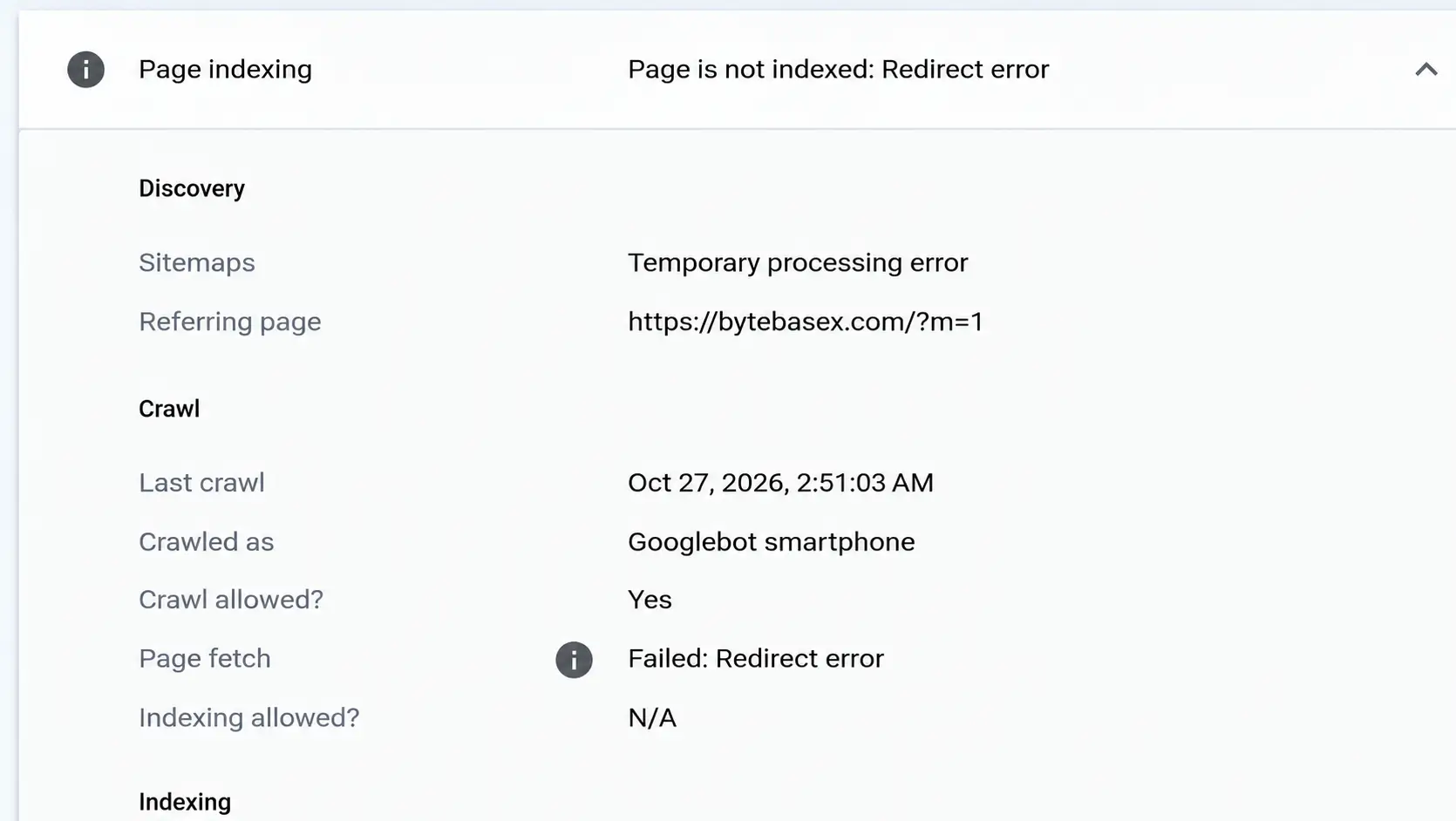
Open a Blogger post on your phone and the address changes from /2026/03/sample-post.html to /2026/03/sample-post.html?m=1. Visitors rarely notice. Googlebot does, and the extra redirect is behind many "Page with redirect" and "Alternate page with proper canonical tag" entries in Search Console.
Blogger has no setting to turn this off. On a custom domain proxied through Cloudflare, though, a small Worker can stop the redirect before it happens. This guide gives you the script, the setup steps, a way to test it, and the Search Console cleanup that follows.
Why Blogger adds ?m=1
Blogger reads the browser's User-Agent on every request. For a phone or tablet it redirects to the same URL with ?m=1 and serves the mobile version of the template. Desktop visitors get the plain URL.
That made sense when most themes had no responsive layout. Today nearly every theme adapts to the screen width, so the parameter adds nothing for readers. Blogger still applies it, and crawlers pay for it.
How ?m=1 causes redirect errors in Search Console
Google crawls with a smartphone bot first. For one post, this is what happens:
- Googlebot Smartphone requests
/2026/03/sample-post.htmlfrom your sitemap. - Blogger redirects it to
?m=1, so the original URL is logged as "Page with redirect". - The
?m=1page declares the clean URL as canonical, so Google logs it as "Alternate page with proper canonical tag". - The desktop crawler requests the clean URL, meets no redirect, and that version usually gets indexed.
| Search Console status | What it means | Caused by ?m=1? |
|---|---|---|
| Page with redirect | The URL sent the crawler somewhere else. | Yes. Mobile crawlers are redirected to the ?m=1 URL. |
| Alternate page with proper canonical tag | The page names another URL as its canonical version. | Yes. The ?m=1 page points back to the clean URL. |
| Redirect error | Google could not follow the redirect, for example because of a loop or an overly long chain. | Rarely. See the causes table further down. |
Requirements
- A custom domain connected to your Blogger blog. Blogs on
blogspot.comhave no server-side fix. - DNS managed by Cloudflare, with the proxy (orange cloud) enabled on the record that points to Blogger.
- SSL/TLS encryption mode set to Full. Flexible mode can cause a redirect loop with Blogger.
The Workers Free plan allows 100,000 requests a day, and every page view, search page and bot visit that matches the route counts. The route setting in step 2 decides what happens past that limit. A route set to fail open sends traffic straight to Blogger. One set to fail closed shows visitors Cloudflare error 1027. Current numbers are on Cloudflare's Workers limits page.
Remove ?m=1 with a Cloudflare Worker
For phones and tablets, the Worker adds ?m=1 to the request it sends to Blogger. Blogger sees the parameter, skips its redirect and returns the mobile view. The visitor's address bar never changes, because the parameter only exists between Cloudflare and Blogger.
Step 1: Create the Worker
- Log in to your Cloudflare dashboard.
- Open Compute in the sidebar, then Workers & Pages.
- Click Create application and choose Start with Hello World!
- Name the Worker
blogger-clean-urlsand click Deploy. - Click Edit code and delete everything in the editor.
- Paste the script below and click Deploy.
This is the same script BytebaseX uses.
const MOBILE_UA = /Mobi|Android|iPhone|iPad|iPod|Silk|KAIOS|BlackBerry|Opera Mini|webOS/i;
const SKIP_PATHS = /^\/(feeds\/|sitemap|robots\.txt|atom\.xml|rss\.xml)/i;
const REDIRECTS = [301, 302, 303, 307, 308];

const hasM = (url) =>
  url.search.slice(1).split("&").some((p) => p === "m" || p.startsWith("m="));

// Remove the "m" parameter without re-encoding the rest of the query string.
function stripM(url) {
  const kept = url.search
    .slice(1)
    .split("&")
    .filter((p) => p && p !== "m" && !p.startsWith("m="));
  url.search = kept.length ? "?" + kept.join("&") : "";
  return url;
}

function withMobileFlag(url) {
  const out = new URL(url);
  out.search = (out.search ? out.search + "&" : "?") + "m=1";
  return out;
}

const getOrigin = (request, url) =>
  fetch(url.toString(), {
    method: request.method,
    headers: request.headers,
    redirect: "manual",
  });

function redirectTarget(response, base) {
  if (!REDIRECTS.includes(response.status)) return null;
  const location = response.headers.get("Location");
  return location ? new URL(location, base) : null;
}

export default {
  async fetch(request, env, ctx) {
    // If the script ever throws, Cloudflare sends the request to Blogger as if no Worker existed.
    ctx.passThroughOnException();

    // Only page loads are touched. Comment posts and other methods pass through.
    if (request.method !== "GET" && request.method !== "HEAD") {
      return fetch(request);
    }

    const url = new URL(request.url);

    // Feeds, sitemaps and robots.txt are not pages.
    if (SKIP_PATHS.test(url.pathname)) {
      return fetch(request);
    }

    // Old links that still carry ?m=1 or ?m=0 get a permanent redirect to the clean URL.
    if (hasM(url)) {
      return Response.redirect(stripM(url).toString(), 301);
    }

    // Phones and tablets: ask Blogger for the mobile view directly, so it has no reason to redirect.
    const isMobile = MOBILE_UA.test(request.headers.get("User-Agent") || "");
    const target = isMobile ? withMobileFlag(url) : url;

    let response = await getOrigin(request, target);

    // If Blogger still sends its own mobile redirect (same page plus ?m=1),
    // follow it once on the server so the visitor never sees it.
    const next = redirectTarget(response, target);
    if (next && hasM(next) && stripM(new URL(next)).href === stripM(new URL(target)).href) {
      response = await getOrigin(request, next);
    }

    // Any other redirect is real (moved post, custom redirect, domain change).
    // Pass it on untouched, apart from removing ?m= from the destination.
    const real = redirectTarget(response, target);
    if (real) {
      const out = new Response(response.body, response);
      out.headers.set("Location", stripM(real).toString());
      return out;
    }

    // Same URL, different HTML for phones and desktops. Tell caches and crawlers.
    const out = new Response(response.body, response);
    out.headers.append("Vary", "User-Agent");
    return out;
  },
};
What the script does
- Sends
?m=1to Blogger for phones and tablets, so Blogger never redirects them. Desktop requests go through as they are. - Answers any URL that already has an
mparameter with a 301 to the clean URL. This cleans up old indexed links and theme links hardcoded with?m=0or?m=1. The rest of the query string stays exactly as received. - Follows Blogger's own mobile redirect once, on the server, if its device detection catches a device the script missed. The visitor still sees the clean URL.
- Passes real Blogger redirects through as redirects. A moved post or a rule under Settings and Errors and redirects keeps returning a 301 to Google instead of a 200 on the old URL.
- Adds
Vary: User-Agent, because one URL can return different HTML for phones and desktops. - Skips feeds, sitemaps,
robots.txtand non-GET requests such as comment submissions. - Caches nothing. Cached HTML keyed by URL alone can hand desktop visitors the mobile page, and edited posts would show stale for as long as the cache lives.
- Falls back to Blogger if the script throws, through
passThroughOnException().
?m= links will use up the daily limit faster than your page views suggest. Blogger's device detection is not documented, so the User-Agent list is a best match. A miss costs one extra request to Blogger and never shows ?m=1 to anyone.
Step 2: Add the Worker route
- Back in the Cloudflare dashboard, open Domains, then Overview, and select your domain.
- Open Workers Routes and click Add route.
- In the Route field, enter your blog's hostname followed by
/*:www.example.com/* - In the Worker field, choose
blogger-clean-urls. - Set Request limit failure mode to Fail open (proceed).
- Click Save.
www, the route only needs the www version. Cloudflare renames menu items now and then, so look for the same options under your domain's Workers section if a label differs.
?m=1.
Test that the redirect is gone
- Open a post on a real phone, tap through a few pages and watch the address bar. No
?m=1should appear. - On a computer, turn on Chrome DevTools' device toolbar and load the same post. Chrome then sends a mobile User-Agent.
- Run the two commands below. Replace the domain with yours.
A mobile request to the clean URL should return a normal response with no location header and a vary header that includes User-Agent:
curl -sI -A "Mozilla/5.0 (Linux; Android 13; Pixel 7) AppleWebKit/537.36 (KHTML, like Gecko) Chrome/120.0.0.0 Mobile Safari/537.36" https://www.example.com/2026/03/sample-post.htmlA request that still carries the parameter should return a 301 to the clean URL:
curl -sI "https://www.example.com/2026/03/sample-post.html?m=1"location ends in ?m=1, the Worker is not running on that hostname. Recheck the route pattern and confirm the DNS record shows the orange cloud.
Clean up Search Console
The Worker stops new redirects. Existing report entries stay until Google recrawls those URLs, which can take days or weeks.
- Open Search Console and select the right property.
- Go to Indexing, then Pages, and click the status you want to clear.
- Click Validate fix if the button appears. Some informational statuses don't offer it, and Google drops those URLs on its own as it recrawls them.
- Run Test live URL in the URL Inspection tool on an important post to confirm Google reaches the clean URL without a redirect.
Keep your sitemap and internal links pointing at clean URLs. Google follows what you link to.
Other causes of redirect errors on Blogger
If "Redirect error" stays after the Worker is live, the parameter was probably not the cause.
| Cause | How to check | Fix |
|---|---|---|
| Cloudflare SSL mode set to Flexible | The browser shows "too many redirects" on your domain. | Set SSL/TLS encryption mode to Full. |
| www and non-www pointing at each other | Open both versions and compare the final URL. | Pick one version in Blogger's custom domain settings and keep Cloudflare DNS consistent with it. |
| Redirect chains | Run curl -sIL on an old HTTP URL and count the hops. |
Allow one hop, from HTTP straight to the final HTTPS URL. |
| Conflicting Cloudflare rules | Review Redirect Rules and Page Rules for patterns that match your blog. | Remove rules that overlap with Blogger's own redirects. |
Troubleshooting
?m=0 or ?m=1 still appears in links
Your theme probably writes it into a link, such as a "view web version" button. The Worker redirects those clicks to the clean URL, but you can remove the source: in Theme, then Edit HTML, search the XML for m=0 and m=1. If you haven't edited theme code before, how to install a Blogger template properly shows how the Theme screen works.
The site loads, but ?m=1 still shows up
The script fails open, so a runtime error doesn't show an error page. Visitors just get Blogger's default behavior. Open the Worker's metrics and logs in the dashboard and look for errors. If a message is unclear, how to read error messages like a developer explains how to find the useful line. Re-pasting the script fixes most copy mistakes.
FAQs
Can I remove ?m=1 from a blogspot.com blog?
Not on the server side. The Worker method needs a custom domain proxied through Cloudflare. Some guides use JavaScript and the History API to rewrite the address bar, but that only changes what the visitor sees. Crawlers still get redirected by Blogger.
Does ?m=1 hurt my Blogger SEO?
It is not a penalty, and Google usually indexes the canonical URL anyway. The cost is extra redirects, cluttered Search Console reports and, for the mobile crawler, a slower path to new posts.
What happens if my blog goes over the free Worker limit?
With the route on fail open, requests skip the Worker and go directly to Blogger. The site stays online, and mobile visitors get the normal ?m=1 behavior until the limit resets at midnight UTC. With fail closed, visitors see Cloudflare error 1027.
Why does Search Console still list ?m=1 URLs after the fix?
The report reflects past crawls, and Google has to recrawl each old URL before its entry disappears. The 301 in the script speeds this up by pointing those old URLs at the clean version.
Can I use a Cloudflare rewrite rule instead of a Worker?
You can try, but on the free plan the rule can only check whether the User-Agent contains "mobi". Some phones and tablets don't include it, so Blogger still redirects them. The Worker uses a wider device list and also covers old ?m=1 links.
Conclusion
Blogger adds ?m=1 for mobile visitors and offers no switch to stop it, but a Cloudflare Worker can request the mobile view without sending anyone anywhere. After deploying it, check a real phone, watch your daily Worker usage and give Search Console a few weeks to catch up. If "Redirect error" remains, start with the causes table above, since SSL mode and www settings are more likely culprits than the parameter itself.
