
Hi, welcome to BytebaseX! In this post, I'm sharing the Textrim Blogger template by Igniel — a free, lightweight theme built for speed and easy reading. It skips thumbnails on the homepage completely, which is the main reason it loads so fast.
Textrim PageSpeed Test Results
Rather than lead with a feature list, here's the part that actually matters: real numbers. I installed Textrim on a test site and ran it through Google PageSpeed Insights, on both mobile and desktop. These are unedited results from my own install, not copied from the developer's demo page.
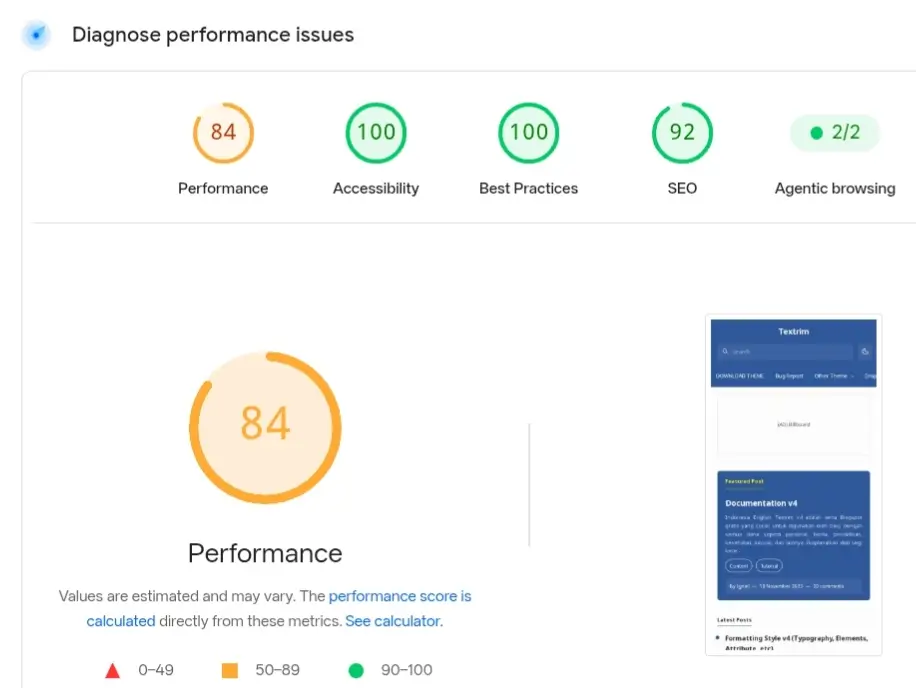
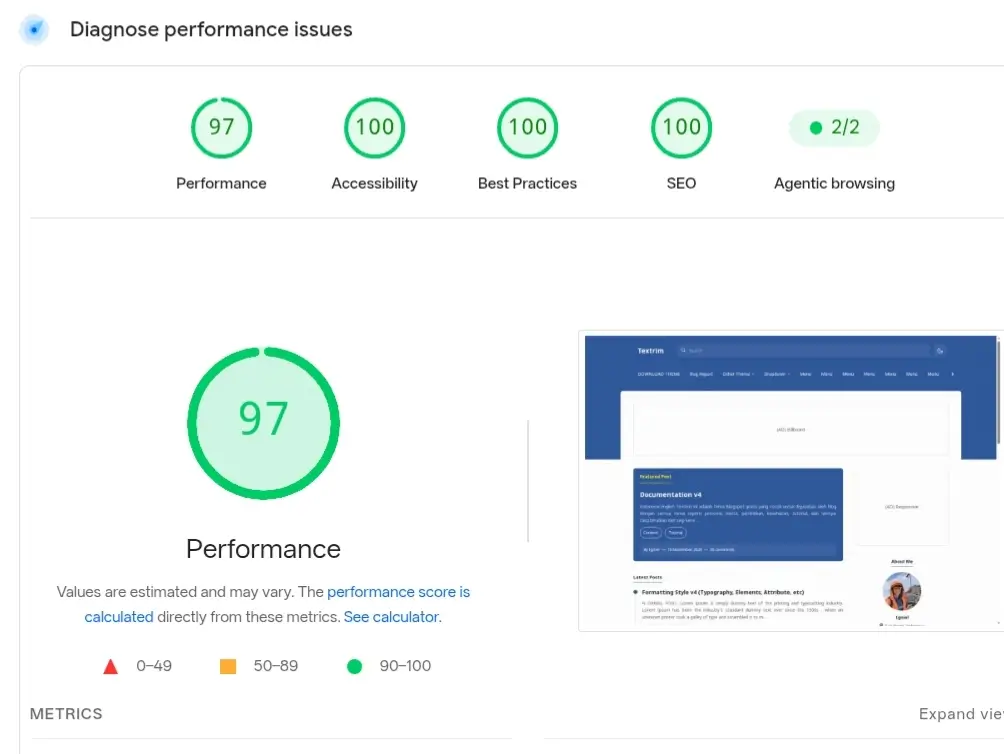
If your own install scores lower than this, it's usually extra scripts, heavy fonts, ad networks, or badly set up widgets, since the base theme itself is this fast by default.
My Honest Review
I tested Textrim on an education blog, and it's genuinely one of the fastest text-based Blogger themes I've used. The no-thumbnail homepage gives it a real speed advantage, and it stays fast even with Google AdSense and Analytics scripts added.
It's a solid pick if you're a writer, tutorial blogger, or personal blogger who cares more about speed and readable content than heavy graphics. If you run into problems, leave a comment; I've worked directly with this theme's code and can usually help.
A Note on This File
Before sharing this download, I installed it myself and confirmed it opens cleanly in Blogger's Restore tool with no errors, using the exact file linked below. Full credit for Textrim's design and code stays with Igniel, the original developer — keep that footer credit link intact when you use it, as the license asks.
What Actually Sets Textrim Apart
Most Blogger themes list twenty or more features, and most of those (responsive, SEO friendly, easy to use) are true of nearly every current theme, not unique to this one. Here's what actually differentiates Textrim specifically:
- No Thumbnail Homepage: The core design decision behind the theme. Removing image thumbnails from the homepage feed is the single biggest reason it loads faster than most alternatives.
- In-Article Related Posts: Related post links are inserted automatically inside the article body itself, not just in a sidebar widget.
- Pre-Built Ad Zones: Billboard, Middle Post, In-Feed, and Sticky Sidebar ad slots are already wired into the layout, so placing ads doesn't mean editing template code yourself.
- Numbered Pagination: A real page-number archive browser, instead of just an infinite-scroll or "Older Posts" link.
- Built on Layout v3 / Widget v2: Uses Blogger's current widget framework rather than legacy markup, which matters for long-term compatibility as Blogger continues to update.
Template Information
| Template Name | Textrim |
| Version | 4 |
| Price | Freemium |
| Last Updated | 10 November, 2023 |
| Platform | Blogger |
| Developer | Igniel |
How to Install the Textrim Blogger Template
First, download the XML file and open your Blogger Dashboard. Go to Theme, then click Restore/Upload. Pick the XML file you downloaded, upload it, and save.
Detailed Guide: How to Install Blogger Template Properly
Download & Demo
Check the live preview before you download. Follow any instructions on the download page.
Common Issues & Fixes
A few problems readers have had with the Textrim Blogger template, and how to fix them:
- Download link won't open: Mega.nz sometimes limits or times out busy links. If it doesn't load the first time, wait a few minutes and try again, or comment below and I'll refresh the link.
- Theme Designer changes don't show up: Blogger sometimes shows an old, cached version of your style. Hard-refresh the page (Ctrl+Shift+R) or clear your browser cache after saving changes in Customize.
- Some widgets are missing after upload: Make sure you upload the full XML file without changing it — Blogger's Restore option needs the complete file to rebuild every widget section correctly.
If you hit a problem not listed here, leave a comment. I check this post regularly and reply to installation issues.
Disclaimer
BytebaseX shares templates and other resources for learning and informational purposes. Some of this content belongs to third parties, and we don't claim ownership of it unless we say so.
We encourage you to support the original creators and get resources from official sources when you can. If you think any content here breaks your copyright, please contact us with the details. We'll review real requests and take action.
Frequently Asked Questions
Is this Blogger template free to download?
Yes, Textrim is free to download. Keep the author credit link in the footer, as the developer's license requires.
Is this template responsive and mobile-friendly?
Yes, it works well on phones, tablets, and desktop computers.
Why does Textrim not show images on the homepage?
It's designed without homepage thumbnails on purpose — this gives you faster loading, better Core Web Vitals scores, and a clean, text-focused layout.
Does this template support AdSense?
Yes, Textrim has several built-in ad spots, including Billboard, In-Feed, Middle Post, and Sticky Sidebar.
Can I customize the template without editing HTML?
Yes, you can change the main colors, fonts, and style through Blogger's Theme Designer (Customize > Advanced).
What should I do if I face problems while installing the template?
Make sure you upload the unzipped .xml file (Textrim-v4.min.xml) from Blogger Dashboard > Theme > Restore. You can also check our full installation guide.
Final Thoughts on Textrim
Overall, Textrim v4 is a great, lightweight Blogger template for site owners who care about speed, simple design, and SEO. Its clean look and optimized code make it a great fit for text-heavy blogs. If you want a fast, distraction-free Blogger theme with strong performance, Textrim is worth trying on your blog.

