
Hi, welcome to BytebaseX! In this post, I'm sharing the Median UI Blogger template by Jago Desian — a free, premium-quality theme with a dashboard-style layout, built for news blogs and content-heavy sites.
Median UI PageSpeed Test Results
Rather than start with a feature list, here's the part that actually matters: real numbers. I ran Median UI through Google PageSpeed Insights on both mobile and desktop. These are unedited results from my own test, not the developer's demo page.
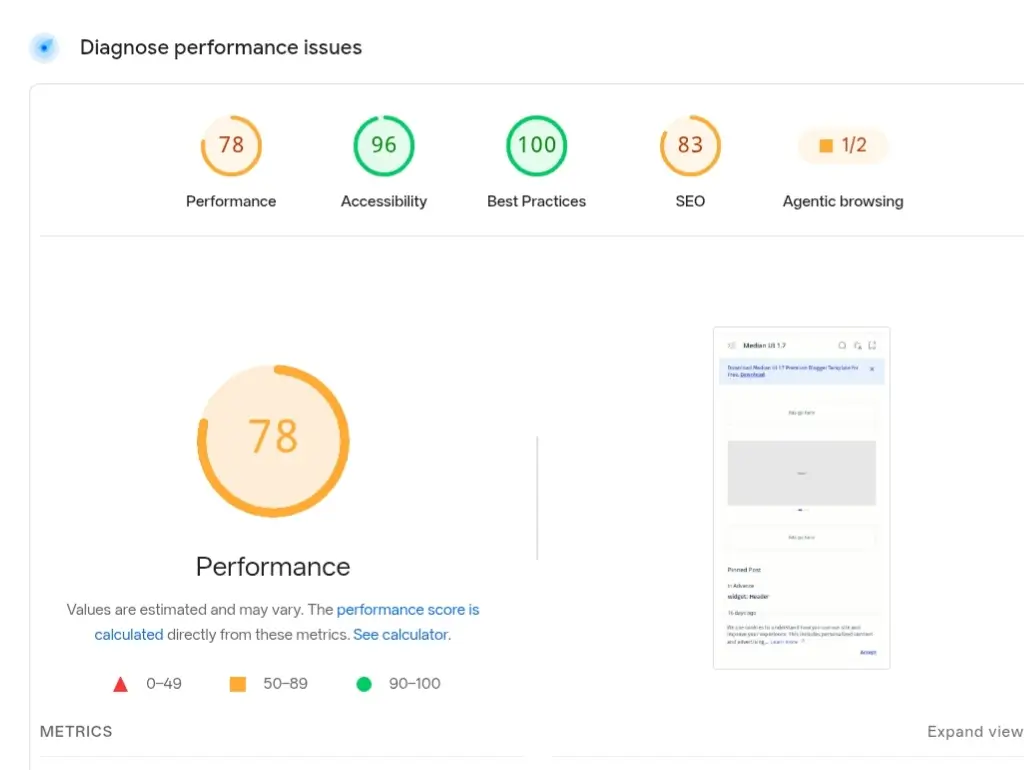
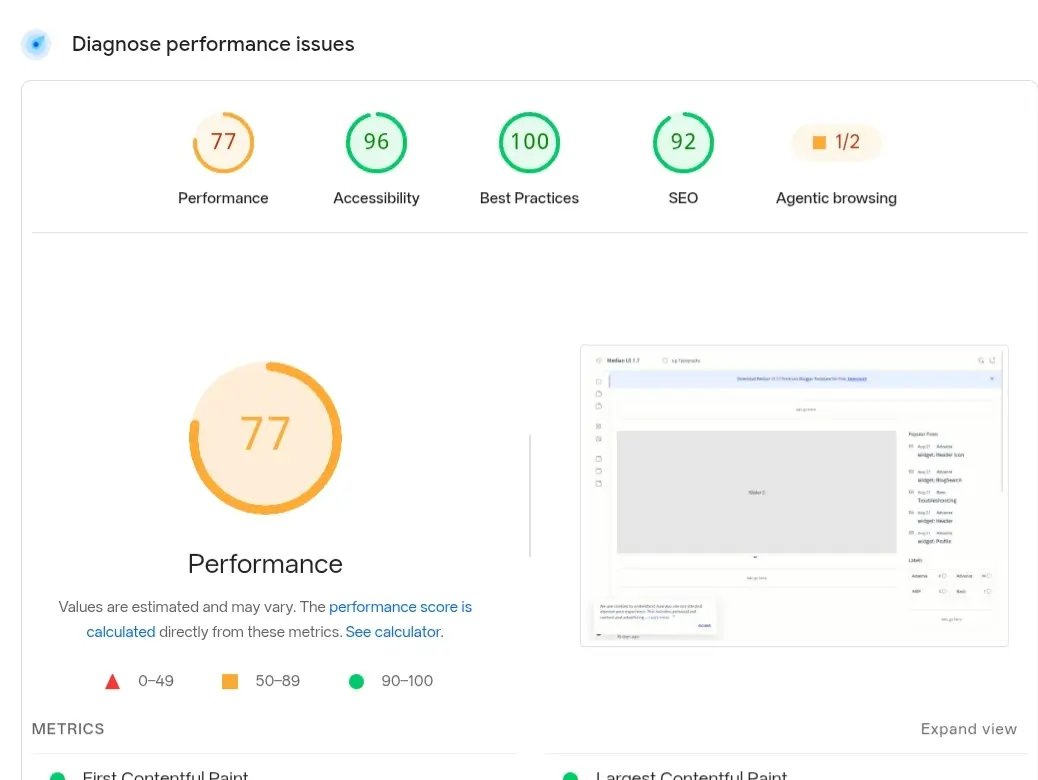
If your install scores lower, it's usually extra scripts, heavy fonts, ad networks, or busy widgets, since the base theme performs well by default.
My Honest Review
I've used this template for both testing and a real production site, and it's genuinely one of the best Blogger themes I've worked with, modern, clean, and well-built.
If you know how to code, you could clean up a few older parts of the code yourself, though it works fine as is; that's an optional improvement, not something you need to do. For non-coder bloggers, this is a solid upgrade over classic, slower themes. If you run into any errors, comment on this post and I'll help where I can.
A Note on This File
The Median UI code is already clean and well organized, so it hasn't needed any cleanup on my end the way some other templates have. I made one small tweak to my own installed copy for my personal setup; the file linked below is the standard, unmodified version from the developer.
What Actually Sets Median UI Apart
Most Blogger themes list twenty or more features, and most of those (responsive, SEO friendly, easy to use) are true of nearly every current theme, not unique to this one. Here's what actually differentiates Median UI specifically:
- Dashboard-Style Layout: A three-column structure with its own dedicated navigation column, built specifically for news and content-heavy sites, not just a standard blog feed.
- Syntax Highlighter Widget: A dedicated widget for showing code with proper syntax highlighting and tabs, genuinely useful if you write technical or coding content.
- Dark Mode Widget: Three dark mode variations built in for readers to choose from, not just a single on/off toggle.
- Dynamic Content Components: Built-in guide lists, pros-and-cons lists, and a manual lightbox for images, features most free themes don't include at all.
- Bookmark Posts Widget: Lets readers save a post to read later, a feature usually only found on larger news platforms.
Template Information
| Template Name | Median UI |
| Version | 1.7 |
| Price | Free |
| Published On | January 10, 2023 |
| Last Updated | July 29, 2026 |
| Platform | Blogger |
| Developer | Jago Desian |
How to Install the Median UI Blogger Template
First, download the XML file and open your Blogger Dashboard. Go to Theme, then click Restore/Upload. Pick the XML file you downloaded, upload it, and save.
Detailed Guide: How to Install Blogger Template Properly
Download & Demo
Check the live preview before you download. Follow any instructions on the download page.
Common Issues & Fixes
A few problems readers have had with the Median UI Blogger template, and how to fix them:
- Download link won't open: Mega.nz sometimes limits or times out busy links. If it doesn't load the first time, wait a few minutes and try again, or comment below and I'll refresh the link.
- Theme Designer changes don't show up: Blogger sometimes shows an old, cached version of your style. Hard-refresh the page (Ctrl+Shift+R) or clear your browser cache after saving changes in Customize.
- Some widgets are missing after upload: Make sure you upload the full XML file without changing it — Blogger's Restore option needs the complete file to rebuild every widget section correctly.
If you hit a problem not listed here, leave a comment. I check this post regularly and reply to installation issues.
Disclaimer
BytebaseX shares templates and other resources for learning and informational purposes. Some of this content belongs to third parties, and we don't claim ownership of it unless we say so.
We encourage you to support the original creators and get resources from official sources when you can. If you think any content here breaks your copyright, please contact us with the details. We'll review real requests and take action.
Frequently Asked Questions
Is this Blogger template free to download?
Yes, this template is free to download. Check the download section above for the latest version.
Is this template responsive and mobile-friendly?
Yes, it works well on phones, tablets, and desktop computers.
What features does this Blogger template include?
The most distinctive ones are listed above. The rest are standard features shared with most modern Blogger themes.
Can I modify the template's code myself?
Yes, you can edit the underlying code yourself if you want to customize it further than the Theme Designer allows.
Does this template support AdSense?
Yes, you can use Google AdSense or other ad networks with this template. Ad eligibility still depends on your own site and the ad network's policies.
Can I customize the design without touching code?
Yes, you can change colors, fonts, layouts, widgets, and other settings through Blogger's built-in customizer.
Do I need coding knowledge to use this template?
Basic customization doesn't need coding. For advanced changes, some HTML and CSS knowledge helps.
What should I do if I face problems while installing the template?
Make sure you're using the correct XML file and followed the install steps. You can also restore your previous theme backup if something goes wrong.
Final Thoughts on Median UI
Overall, Median UI 1.7 is a well-designed Blogger template with a clean, responsive, and feature-rich experience for modern blogs. Its focus on performance, readability, and useful built-in components makes it a solid pick for news, magazine, and content-focused sites. If you want a lightweight template packed with features and a professional look, Median UI 1.7 is worth trying.

